
Top Stories
SysInternals Releases 5 Essential Tools to Boost Windows Performance

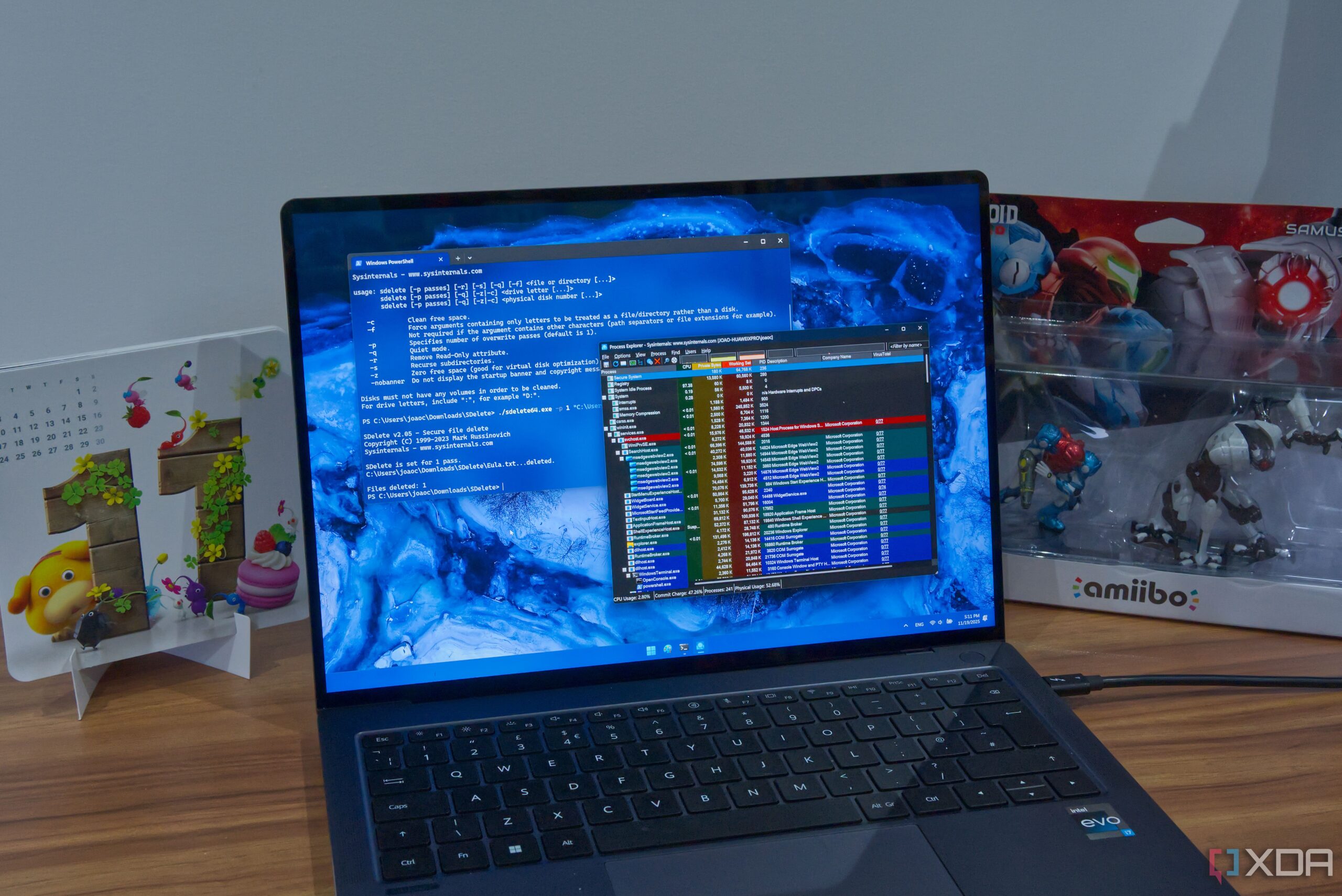
UPDATE: SysInternals has just unveiled five powerful tools that can significantly enhance the performance of your Windows PC. Developed by Mark Russinovich and acquired by Microsoft, these tools are essential for both seasoned IT professionals and everyday users seeking to optimize their systems.
WHAT’S NEW: The latest updates to the SysInternals suite include Autoruns, Process Explorer, Process Monitor, SDelete, and ZoomIt. Each tool serves a unique purpose, from monitoring system tasks to securely deleting files—all aimed at improving your PC’s efficiency and security.
AUTOMATIC OPTIMIZATION: With Autoruns, users can pinpoint all programs that launch automatically during startup. This tool provides an easy interface to manage these tasks, allowing users to disable unnecessary programs that could slow down their systems. By streamlining startup processes, users may experience a notable boost in performance and responsiveness.
ADVANCED MONITORING: Process Explorer elevates the traditional Task Manager by offering a comprehensive view of active processes. Users can inspect process trees, set priorities, and even assign CPU cores to specific tasks. This immediate access to resource usage data makes it easier to diagnose performance issues, ensuring your system runs smoothly.
REAL-TIME FILE MONITORING: For those concerned about security, Process Monitor logs every file system operation. This feature allows users to track suspicious activities or errors related to file access, equipping them with the insights needed to protect their systems from potential threats.
SECURE FILE DELETION: The command-line tool SDelete allows users to permanently delete files, ensuring they cannot be recovered. This is crucial for anyone handling sensitive information. Users can easily execute commands to overwrite files, making data recovery virtually impossible.
PRESENTATION SIMPLIFIED: Lastly, ZoomIt enhances presentations by allowing users to zoom in on screen content and annotate in real-time. This tool is particularly beneficial for educators and professionals who need to highlight key points during presentations.
IMMEDIATE RELEVANCE: As Windows 11 continues to evolve, these SysInternals tools remain indispensable for maintaining system health. With the growing focus on cybersecurity and efficiency, users are urged to integrate these tools into their daily routines.
WHAT’S NEXT: These tools are part of a larger suite available on the SysInternals documentation page, inviting users to explore additional options. With many tools receiving ongoing updates, staying informed about new releases can further enhance your Windows experience.
In a world where system performance and security are paramount, leveraging these tools can significantly impact your daily computing. Don’t miss out on this opportunity to elevate your Windows experience—check out the SysInternals suite today!

National Security Expert Condemns Trump’s Boat Strikes Defense

New York Launches Urgent Scam Prevention Tool for Seniors in 2026

Matt Van Epps Declared Winner in Tennessee’s Hotly Contested Election

Trump Administration Faces Legal Scrutiny Over Drug Strikes

Trump Administration Launches Urgent Savings Initiative for Kids

Urgent Update: Deadly Fire Claims Life in Raymond, Investigation Ongoing

Stockton Mass Shooting Claims Four Lives, Community in Shock

Fremont Home Sells for $1.7 Million in Record Time

Metcalf Builders Launches $43 Million Affordable Housing Project

Inventor Achieves Breakthrough with 2 Billion FPS Laser Video

Community Unites for 7th Annual Into the Light Walk for Mental Health

Charlie Sheen’s New Romance: ‘Glowing’ with Younger Partner

Dua Lipa Aces GCSE Spanish, Sparks Super Bowl Buzz with Fans

Curium Group, PeptiDream, and PDRadiopharma Launch Key Cancer Trial

Mother Fights to Reunite with Children After Kidnapping in New Drama

Former Mozilla CMO Launches AI-Driven Cannabis Cocktail Brand Fast

Tyler Technologies Set to Reveal Q3 Earnings on October 22

Israel Reopens Rafah Crossing After Hostage Remains Returned
-
 Science1 month ago
Inventor Achieves Breakthrough with 2 Billion FPS Laser Video
-
 Health2 months ago
Community Unites for 7th Annual Into the Light Walk for Mental Health
-
 Top Stories2 months ago
Charlie Sheen’s New Romance: ‘Glowing’ with Younger Partner
-
 Entertainment2 months ago
Dua Lipa Aces GCSE Spanish, Sparks Super Bowl Buzz with Fans
-
 Health2 months ago
Curium Group, PeptiDream, and PDRadiopharma Launch Key Cancer Trial
-
 Entertainment2 months ago
Mother Fights to Reunite with Children After Kidnapping in New Drama
-
 Top Stories2 months ago
Former Mozilla CMO Launches AI-Driven Cannabis Cocktail Brand Fast
-
 Business2 months ago
Tyler Technologies Set to Reveal Q3 Earnings on October 22
-
 World2 months ago
Israel Reopens Rafah Crossing After Hostage Remains Returned
-

 Health2 months ago
North Carolina’s Biotech Boom: Billions in New Investments
-

 Entertainment2 months ago
Red Sox’s Bregman to Become Free Agent; Tigers Commit to Skubal
-

 World2 months ago
R&B Icon D’Angelo Dies at 51, Leaving Lasting Legacy