
Top Stories
Urgent Alert: 4 Signs You Must Replace Your NAS Drives NOW!

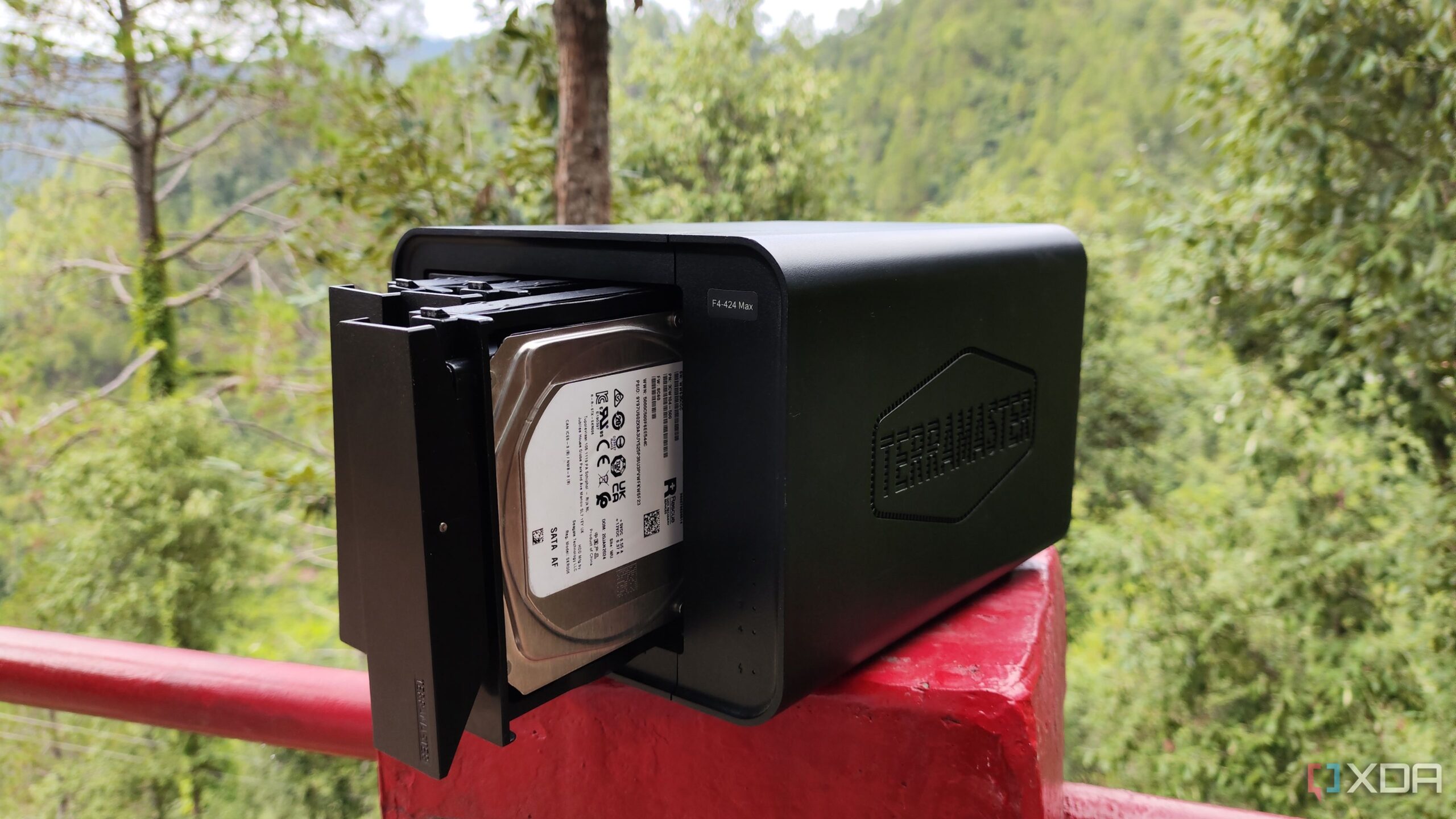
URGENT UPDATE: If you use a Network-Attached Storage (NAS) system, new reports highlight four critical signs that indicate it’s time to replace your storage drives immediately. As SSDs and HDDs often have short lifespans, recognizing these warning signs could save you from significant data loss.
WHAT YOU NEED TO KNOW: Storage drives can fail without warning, leading to potential downtime and loss of vital data. Experts emphasize the importance of monitoring your NAS drives closely. Here are the key indicators that your drives may be failing:
1. S.M.A.R.T. Alerts: The Self-Monitoring, Analysis, and Reporting Technology (S.M.A.R.T.) built into your drives provides crucial data regarding their health. A high “Reallocated Sector Count” suggests your drive is struggling to manage errors. Additionally, the “Uncorrectable Sector Count” indicates sectors that are beyond repair. If these metrics show concerning numbers, it’s time to act.
2. Unusual Noises: All hard drives make some noise, but if you hear loud screeching, grinding, or rapid clicking, your HDD may be facing mechanical failure. Experts advise checking S.M.A.R.T. values for “Spin Retry Count” and “Seek Error Rate” if these sounds become prevalent.
3. Slow File Transfers: If reading and writing files takes significantly longer than usual, it could signal failing drives. Various factors influence transfer speeds, but if your network is functioning properly, the problem likely lies with your HDD or SSD. Slow sectors could be dragging down performance, or a RAID drive may have already failed, impacting the entire storage pool.
4. Inaccessible Files: Sudden issues accessing files on your NAS may indicate that bad sectors are rendering data unreadable. This could stem from issues beyond your control, like RAID write-hole problems or firmware glitches. If your files start showing strange errors or disappear altogether, immediate action is crucial.
WHY THIS MATTERS NOW: With the increasing reliance on digital storage for personal and professional data, the consequences of drive failure can be devastating. Implementing a 3-2-1 backup strategy—keeping three copies of your data on two different media types, with one copy stored offsite—can safeguard your information against unexpected drive failures.
WHAT TO DO NEXT: If your NAS shows any of these warning signs, consider replacing the drives immediately. Additionally, for those using RAID levels, adding hot spares can significantly reduce recovery time and help maintain data integrity.
Stay vigilant and proactive to protect your data! Share this urgent update with anyone who might be at risk of losing their information due to failing NAS drives.

Serena Williams Credits Early Career for Focus on Motherhood

WWE Raw Results: Jey Uso’s Meltdown, Gunther Advances, Big Matches Set

Analyst Slams FBI Chief Kash Patel Over Alarming Report

NYCFC Appoints Todd Dunivant as Chief Soccer Officer Today

Mets Sign Devin Williams to Urgent $50 Million Deal

Art for Recovery Transforms Lives: Cancer Survivors Find Hope

Urgent Fire Displaces Two Residents in Mountain View Apartment

Nominations Open NOW for 2026 Scheketa Hart-Burns Award in Aurora

Uber Driver Shot in Head Released from Hospital, Investigation Ongoing

Inventor Achieves Breakthrough with 2 Billion FPS Laser Video

Community Unites for 7th Annual Into the Light Walk for Mental Health

Charlie Sheen’s New Romance: ‘Glowing’ with Younger Partner

Dua Lipa Aces GCSE Spanish, Sparks Super Bowl Buzz with Fans

Curium Group, PeptiDream, and PDRadiopharma Launch Key Cancer Trial

Mother Fights to Reunite with Children After Kidnapping in New Drama

Former Mozilla CMO Launches AI-Driven Cannabis Cocktail Brand Fast

Tyler Technologies Set to Reveal Q3 Earnings on October 22

Israel Reopens Rafah Crossing After Hostage Remains Returned
-
 Science1 month ago
Inventor Achieves Breakthrough with 2 Billion FPS Laser Video
-
 Health2 months ago
Community Unites for 7th Annual Into the Light Walk for Mental Health
-
 Top Stories2 months ago
Charlie Sheen’s New Romance: ‘Glowing’ with Younger Partner
-
 Entertainment2 months ago
Dua Lipa Aces GCSE Spanish, Sparks Super Bowl Buzz with Fans
-
 Health2 months ago
Curium Group, PeptiDream, and PDRadiopharma Launch Key Cancer Trial
-
 Entertainment2 months ago
Mother Fights to Reunite with Children After Kidnapping in New Drama
-
 Top Stories2 months ago
Former Mozilla CMO Launches AI-Driven Cannabis Cocktail Brand Fast
-
 Business2 months ago
Tyler Technologies Set to Reveal Q3 Earnings on October 22
-
 World2 months ago
Israel Reopens Rafah Crossing After Hostage Remains Returned
-

 Health2 months ago
North Carolina’s Biotech Boom: Billions in New Investments
-
 Entertainment2 months ago
Red Sox’s Bregman to Become Free Agent; Tigers Commit to Skubal
-

 World2 months ago
R&B Icon D’Angelo Dies at 51, Leaving Lasting Legacy